
payday
  • Increase font size
  • Default font size
  • Decrease font size
Home Ham-Radio Shack nanoKeyer -Extensions

nanoKeyer -Extensions

Drucken PDF

Extensions

I've applied the following extension to my nanoKeyer:

  • Powersupply
  • Memory bank selection
  • smaller code changes


Power-supply

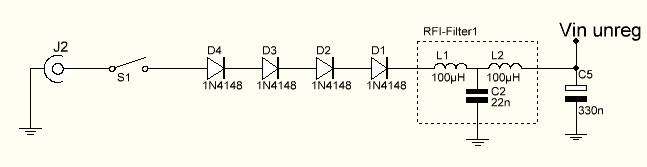
The Arduino nano board has a direct input to its 5V regulator. When applying 13.8V to this input, the regulator gets a little bit hot. This simple circuit
Power

reduces the the input voltage about 3.2V, which helps to keep the regulator cooler. Additionaly a reverse-polarity protecion circuit and a rf-filter is provided.

Memory bank selection

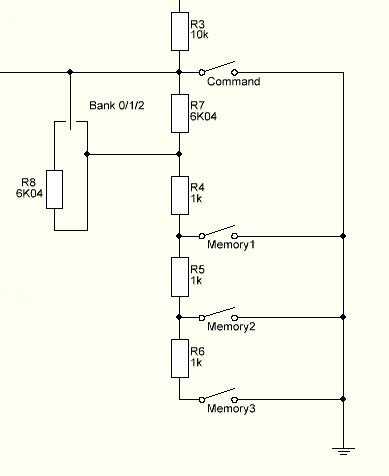
On the current nanoKeyer circuit board, only three memory keys and the command key are available. Usually I work /qrp and /p so I don't want to reprogramm the memories constantly.

I've added a single-pole, three position switch to select te memories 1-3, 4-6 or 7-9 on the three memory buttons.
Banks

The sketch has to be updated, to support the switch settings correctly.

      1 
      2 
      3 
      4 
      5 


      6 


      7 


      8 

      9 

     10 
     11 
     12 
     13 
     14 
     15 
     16 
     17 
     18 
     19 
     20 
     21 
     22 
     23 
     24 
     25 
     26 
     27 
     28 
     29 
     30 
     31 
     32 
     33 
     34 
     35 

     36 


     37 


     38 
     39 

     40 

     41 
     42 

     43 

     44 
     45 
     46 
     47 
     48 
     49 
    //------------------------------------------------------------------
    #ifndef FEATURE_LEGACY_BUTTONS
      #ifdef  DK_BANKSWITCH
        void setOneButton(int button, int index) {
            int button_value = int(1023 * (float(button * 
              analog_buttons_r2)/float((button * analog_buttons_r2) + 
              analog_buttons_r1)));
            int lower_button_value = int(1023 * (float((button-1) * 
              analog_buttons_r2)/float(((button-1) * analog_buttons_r2) + 
              analog_buttons_r1)));
            int higher_button_value = int(1023 * (float((button+1) * 
              analog_buttons_r2)/float(((button+1) * analog_buttons_r2) + 
              analog_buttons_r1)));
            button_array_low_limit[index] = (button_value - ((button_value - 
              lower_button_value)/2));
            button_array_high_limit[index] = (button_value + ((higher_button_value -
              button_value)/2));
        }
        void initialize_analog_button_array() {
          setOneButton(0,0);
          setOneButton(1,3);
          setOneButton(2,2);
          setOneButton(3,1);
          setOneButton(4,9);
          setOneButton(5,8);
          setOneButton(6,7);
          setOneButton(7,6);
          setOneButton(8,5);
          setOneButton(9,4);
        }  
      #else
        void initialize_analog_button_array() {
          
          int button_value;
          int lower_button_value;
          int higher_button_value;
          
          #ifdef OPTION_REVERSE_BUTTON_ORDER
          byte y = analog_buttons_number_of_buttons - 1;
          #endif
            
          for (int x = 0;x < analog_buttons_number_of_buttons;x++) {
            button_value = int(1023 * (float(x * analog_buttons_r2)/float((x * 
              analog_buttons_r2) + analog_buttons_r1)));
            lower_button_value = int(1023 * (float((x-1) * 
              analog_buttons_r2)/float(((x-1) * analog_buttons_r2) + 
              analog_buttons_r1)));
            higher_button_value = int(1023 * (float((x+1) * 
              analog_buttons_r2)/float(((x+1) * analog_buttons_r2) + 
              analog_buttons_r1)));
            #ifndef OPTION_REVERSE_BUTTON_ORDER
            button_array_low_limit[x] = (button_value - ((button_value - 
              lower_button_value)/2));
            button_array_high_limit[x] = (button_value + ((higher_button_value - 
              button_value)/2));
            #else
            button_array_low_limit[y] = (button_value - ((button_value - 
              lower_button_value)/2));
            button_array_high_limit[y] = (button_value + ((higher_button_value - 
              button_value)/2));    
            y--;
            #endif
          }
        }
      #endif
    #endif

    The updated sketch can be downloaded from here.

    Code updated to the Say-Hi Feature

    The Say-Hi feature is coded a little bit "ugly". I've updated the feature this way:

      1 
      2 
      3 
      4 
      5 
      6 
      7 
      8 
      9 
     10 
     11 
     12 
     13 
     14 
     15 
     16 
     17 
     18 
     19 
     20 
      if (machine_mode != BEACON) {
        #ifdef FEATURE_SAY_HI
        //  store current setting
        int oldKey = key_tx;
        key_tx = 0;
        int oldSideTone=sidetone_mode;
        sidetone_mode = SIDETONE_ON;

        // say HI
        delay(201); 
        send_char('D',NORMAL);
        send_char('L',NORMAL);
        send_char('2',NORMAL);
        send_char('S',NORMAL);
        send_char('B',NORMAL);
        send_char('A',NORMAL);
        sidetone_mode = oldSideTone;
        key_tx = oldKey;
        #endif
      }  

    The keyer now sends my call during power-up even if the sidetone is switched of. The state of the transmitter key is also save correctly.


    Aktualisiert ( Samstag, den 18. Mai 2013 um 09:27 Uhr )  

    Anmelden

    mod Lca

    Powered by mod LCA

    You can support the further development of vna/J with a donation via PayPal - many thanks in advance for this!

    Betrag: 

    Filderstadt

    Datum: 18.06.2013
    Zeit: 08:35:49
    Temperatur: 24.5°C
    Luftdruck: 1014.4hPa
    Wind: 5.0km/h
    Richtung: WSW
    Gefühlte Temp.: 24.5°C

    Design by i-cons.ch / etosha-namibia.ch